

Shrink a picture to pixel art, or to a mosaic, and it comes out darker than the picture. Not everywhere: the flat areas are fine. The edges darken, wherever light meets dark, and on a busy photo that’s most of it. The cause is one shortcut, and I measured how much it costs while building this site’s pixel art converter and mosaic maker: about 5% of the light from a typical photograph, and up to three quarters of it from a single square.
A pixel value is not an amount of light
The numbers in an image file aren’t proportional to light. A pixel stored as 128, halfway between black and white on the file’s scale, gives off about 21% of the light a white pixel does. The scale is bent on purpose, because eyes are more sensitive to steps in the dark than in the light, and bending it spends the file’s 256 levels where they can be seen. It’s a bit like a volume knob: halfway round isn’t half as loud.
Averaging is where the bend bites. The average colour of a block of pixels is the average of their light, not of their file numbers. Take the simplest block there is, one black pixel and one white one. Averaging the numbers gives 128. Averaging the light gives half of white’s light, which the file stores as 188. Those are very different greys.
The checkerboard test
So the test is a checkerboard of single black and white pixels, shrunk by eight. The right answer is 188. I gave it to five downscalers people actually use, at their default settings.
| Downscaler | Result (188 is right) |
|---|---|
Chromium 155, canvas drawImage at low, medium and high quality |
127, too dark |
Chromium 155, createImageBitmap with a resize |
127, too dark |
Pillow 10.2, resize with BOX, BILINEAR or LANCZOS |
128, too dark |
ImageMagick 6, convert -resize |
127, too dark |
ImageMagick 6, with -colorspace RGB before and -colorspace sRGB after |
187, right |
ffmpeg 6, scale with the default filter or area |
128, too dark |
sharp 0.35 (libvips 8.18), resize with lanczos3 or mitchell |
128, too dark |
Every one of them, at its defaults, averages the file’s numbers. Only ImageMagick offers the correct answer, and only if you ask for it in two extra flags. The browser’s canvas, which is what most online converters use, is in the first row.

That’s what the mistake looks like. Each panel is the shrunken checkerboard on its left half and, on its right half, a flat grey of 188, which is the brightness the checkerboard really has. On the left, the quick way: 128 beside 188, plainly darker. On the right, averaged as light: 187 beside 188.
On photographs
A checkerboard is the worst case, so I measured photographs too: the 24 Kodak test images, the standard set in image compression research, shrunk to 64 squares across both ways. For each picture I added up the light its squares give off when averaged the quick way, and again when averaged the right way, and compared the two totals. The difference is the light the quick way loses.
- Average of the 24 photos
- Most affected photo
| Squares across | Less light, average of 24 photos | From the least to the most affected | Worst single square |
|---|---|---|---|
| 32 | 6.5% | 2.3 to 20.6% | 76% |
| 48 | 5.4% | 1.6 to 17.4% | 71% |
| 64 | 4.7% | 1.5 to 14.7% | 75% |
| 128 | 3.2% | 1.0 to 9.8% | 79% |
Whole pictures lose a few percent of their light, and busy ones lose more: the worst of the 24 at 64 across, a line of motocross riders, loses 14.7%. The single worst square in every photo loses well over half its light, and that’s the part you see: dark fringes along every edge, so the picture reads as muddy rather than as wrong.
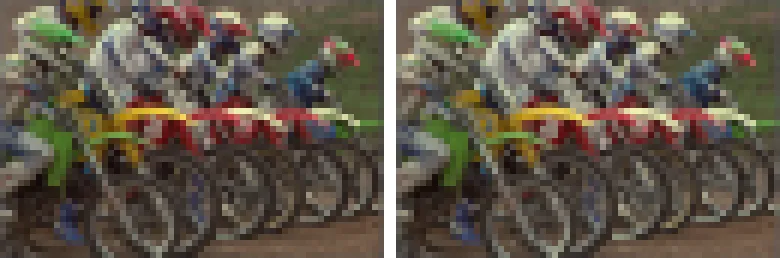
Left, the quick way; right, averaged as light. The wheels and the white jerseys are where to look.
What it does to a mosaic
A mosaic adds a second step: each square is matched to the nearest brick colour, so a square that comes out too dark gets a darker brick. With the mosaic maker’s default palette of 40 brick colours, averaging the quick way changed 11% of the bricks on an average photo at 64 across, and 29.5% on the motocross photo, each changed brick sitting a mean 7.4 sRGB steps from the one it should have been. At 32 across it’s 14% of bricks on average and 38% at worst.
- Average of the 24 photos
- Most affected photo
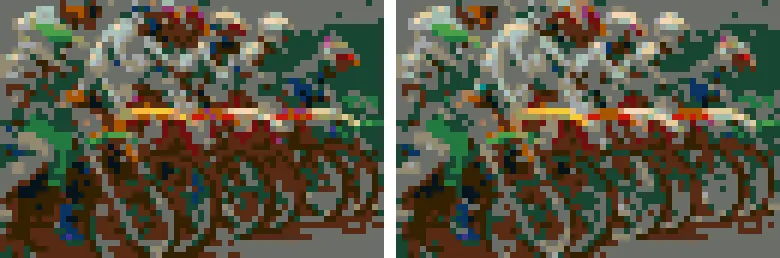
Those are bricks you’d buy and place. A mosaic that comes out darker than its photo is usually this and nothing else.
The fix
Convert each value to light, average, convert back. Three lines, and it’s what the tools on this site do.
const toLinear = (v) => (v <= 0.04045 ? v / 12.92 : ((v + 0.055) / 1.055) ** 2.4);
const toSrgb = (v) => (v <= 0.0031308 ? v * 12.92 : 1.055 * v ** (1 / 2.4) - 0.055);

// The average of a block of pixel values, each 0 to 255.
function average(values) {
  const light = values.reduce((sum, v) => sum + toLinear(v / 255), 0) / values.length;
  return Math.round(255 * toSrgb(light));
}

average([0, 255]); // 188, not 128
The two conversions are the standard curve every screen and every image file uses to turn stored numbers into light (its name is the sRGB transfer function), so there’s nothing to tune. The cost is a lookup per pixel, which is nothing.
When it matters
Whenever a downscale has to represent fine detail with few pixels: pixel art, mosaics, bead patterns, cross-stitch charts, thumbnails of text or line art. A photo shrunk by a quarter for a web page loses a fraction of a percent and nobody can tell. A photo shrunk to 48 bricks across loses an eighth of its light along every edge, and everyone can.
If you use ImageMagick, add the two colourspace flags. If you use anything else at its defaults, including a browser, assume the quick way and expect the dark edges. If you want it right without thinking about it, the pixel art converter, the mosaic maker and the image resizer here all average light.
LEGO® is a trademark of the LEGO Group, which does not sponsor, authorise or endorse this site.