

More studs always look better. That’s the first thing the measurement showed, and it means “how big should it be” has no answer until you decide what a piece is worth to you. I measured it while adding a suggested size to this site’s LEGO mosaic maker, and for most photographs the answer came out at 64 studs across.
The sizes you can buy
LEGO sells baseplates in two sizes, 32×32 studs and a grey 48×48, so the widths worth considering are the ones that come out in whole baseplates. A stud is 8 mm, which gives the finished size.
| Studs across | Baseplates | Pieces, if square | Finished width |
|---|---|---|---|
| 32 | 1 of 32×32 | 1,024 | 25.6 cm, 10.1 in |
| 48 | 1 of 48×48 | 2,304 | 38.4 cm, 15.1 in |
| 64 | 4 of 32×32 | 4,096 | 51.2 cm, 20.2 in |
| 96 | 4 of 48×48 | 9,216 | 76.8 cm, 30.2 in |
| 128 | 16 of 32×32 | 16,384 | 102.4 cm, 40.3 in |
| 192 | 16 of 48×48 | 36,864 | 153.6 cm, 60.5 in |
The pieces column is the one to watch. Doubling the width doesn’t double the pieces, it quadruples them, because a mosaic grows in two directions at once. So a 96-stud mosaic costs four times a 48-stud one, not twice, and a 192-stud one costs sixteen times as much.
A photo is rarely square, and its height follows its shape: a 3:2 photo at 64 across is 64 × 43, or 2,752 pieces.
The same photo at four sizes
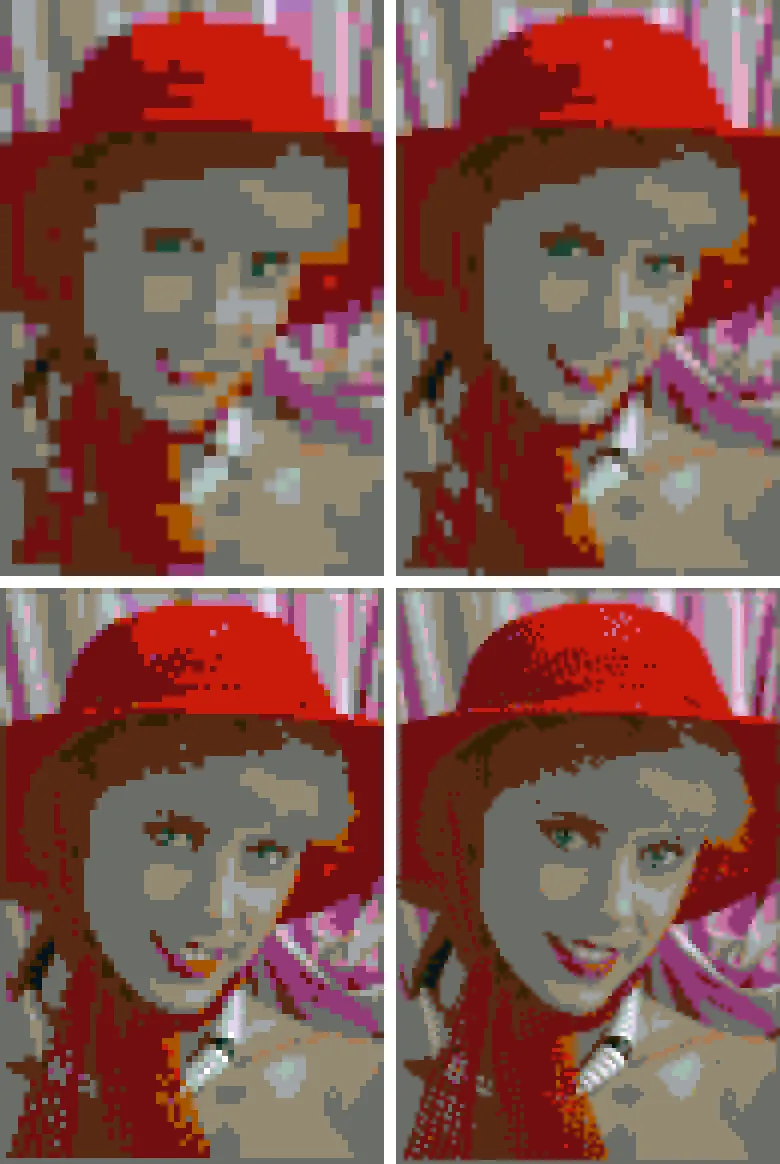
Top row 32 and 48 studs across, bottom row 64 and 96, all from the same photograph with the same 40 colours. At 32 it’s a woman in a red hat and not much more. At 48 the eyes and mouth are there. At 64 she has an expression. At 96 the hair separates into strands and the necklace into beads. Every step is better, which is the problem: your eye never tells you to stop.
How much detail each size buys
To put a number on “better”, I compared each mosaic with the photo it came from. Take a small patch of the photo, look at the brick that covers it, and ask how far apart the two colours are. Do that for every patch and average the answers, and you have one number for the whole mosaic: how far, on average, its bricks are from the real colours. A smaller number is a closer match. (The colour distance is measured in OKLab, a way of comparing colours built so that equal numbers look like equal differences to the eye, which the raw red, green and blue values of a pixel don’t.)
I did this for the 24 Kodak test photographs, the standard set used in image compression research, so the numbers can be read against anything else measured on them. Each photo became a mosaic at 16, 32, 48, 64, 96, 128 and 192 studs across, with the maker’s default palette of the 40 brick colours most widely available as a 1×1 plate.
To make the result easy to read, I put it on a scale from 0 to 100. The smallest mosaic the maker allows, 16 studs across, is the worst match and scores 0. The largest, 192 across, is the best match and scores 100. Every other size lands somewhere between, and its figure is how much of the possible improvement it gets you. I call that the detail a size buys.
| Studs across | Detail bought, average of 24 photos |
|---|---|
| 32 | 37% |
| 48 | 53% |
| 64 | 64% |
| 96 | 77% |
| 128 | 86% |
| 192 | 100% |
The line climbs quickly at first and then more slowly, but it never goes flat. The knee I’d hoped to find, a size past which more studs stop buying detail, isn’t there for a photograph. If you decide you want 90% of the best possible detail, you need 128 studs across for 4 of the photographs and 192 for the other 20, which just says “bigger is better”, and you knew that.
Weighing detail against pieces
What changes the answer is cost. Put the pieces on the same 0-to-100 scale, where 16 across is 0% of the pieces and 192 across is 100%, and you can draw the two lines on one chart.
- Detail bought
- Share of the pieces
Read it like a value-for-money chart. The blue line is what you get, the orange line is what you pay, and the gap between them is the value. Up to 64 studs the detail line races ahead of the pieces line. After 96 the pieces line catches up fast, and by 192 you’ve paid for everything to get everything. So each size gets a score: the detail it buys minus the share of the pieces it costs, which is the size of that gap.
| Studs across | Detail bought | Share of the pieces | Score |
|---|---|---|---|
| 32 | 37% | 2% | 0.35 |
| 48 | 53% | 6% | 0.47 |
| 64 | 64% | 10% | 0.53 |
| 96 | 77% | 24% | 0.53 |
| 128 | 86% | 44% | 0.42 |
| 192 | 100% | 100% | 0 |
On the average photo, 64 and 96 finish level: 96 buys another 13 points of detail for another 14 points of pieces. A tie, or anything within the measurement’s noise of one, goes to the cheaper size. Photo by photo, 64 wins on 21 of the 24. The three that go to 96 are the busiest in the set, motocross riders, a street of painted houses and a mountain stream, all full of fine detail that 64 studs smear.
For anyone who wants the exact rule, it fits in a few lines. error[w] is
the average colour distance between the photo and its mosaic w studs
across.
const detail = (w) => (error[16] - error[w]) / (error[16] - error[192]);
const pieces = (w) => (w * w - 16 * 16) / (192 * 192 - 16 * 16);
const score = (w) => detail(w) - pieces(w);

const best = Math.max(...SIZES.map(score));
// The smallest size within the noise of the best: noise measured at 0.02.
const suggested = SIZES.find((w) => score(w) >= best - 0.02);
The mosaic maker runs this on your own picture when you load it, in about a fifth of a second, and marks the result on its size cards. Logos are less predictable than photographs, because their error lives along the edges of their shapes rather than everywhere at once: a red disc with a black ring and a two-letter lettermark both scored 48, this site’s otter icon 64, and a plain square on white, which 32 studs reproduce exactly, 32.
What to build
For a photograph, 64 studs across. That’s four 32×32 baseplates and between 2,752 and 4,096 pieces depending on the shape, and it’s where detail per piece is best for 21 of 24 photographs.
For a busy scene, crowds, foliage, architecture, 96. It’s four 48×48 baseplates and more than twice the pieces, and on those pictures the pieces earn their place.
For a logo, 48 or 64, and it’s worth loading the picture to see which: a shape with little edge is done by 48, one 48×48 baseplate, and a busier mark wants 64.
Below 32, think again. At 16 studs across the red hat is a red blob, and the face is gone.
One honest caveat. The rule prices every piece the same and values detail only by how far the bricks sit from the photo. It knows nothing about where the mosaic will hang. A portrait for the living-room wall may deserve 96, and the maker will show you exactly what the extra pieces buy before you order any.
For what it’s worth, I don’t always take my own advice. The build I actually want to make is a Hollow Knight at 192 × 251 studs: 48,192 pieces on 48 baseplates of 32×32, two metres tall, and about £1,800 on BrickLink at the time of writing. The rule above exists so that I know exactly what I’m doing when I ignore it. 😅
LEGO® is a trademark of the LEGO Group, which does not sponsor, authorise or endorse this site.